
Credits and credit packs
For gym members. Where your gym offers credit packs, you can book events with credits, for example with a 10-class pass. Credits are separate from your membership.
Check your balance
Open Credits & packs from the credits pill under Bookings on your home screen, or Credits in your account menu.
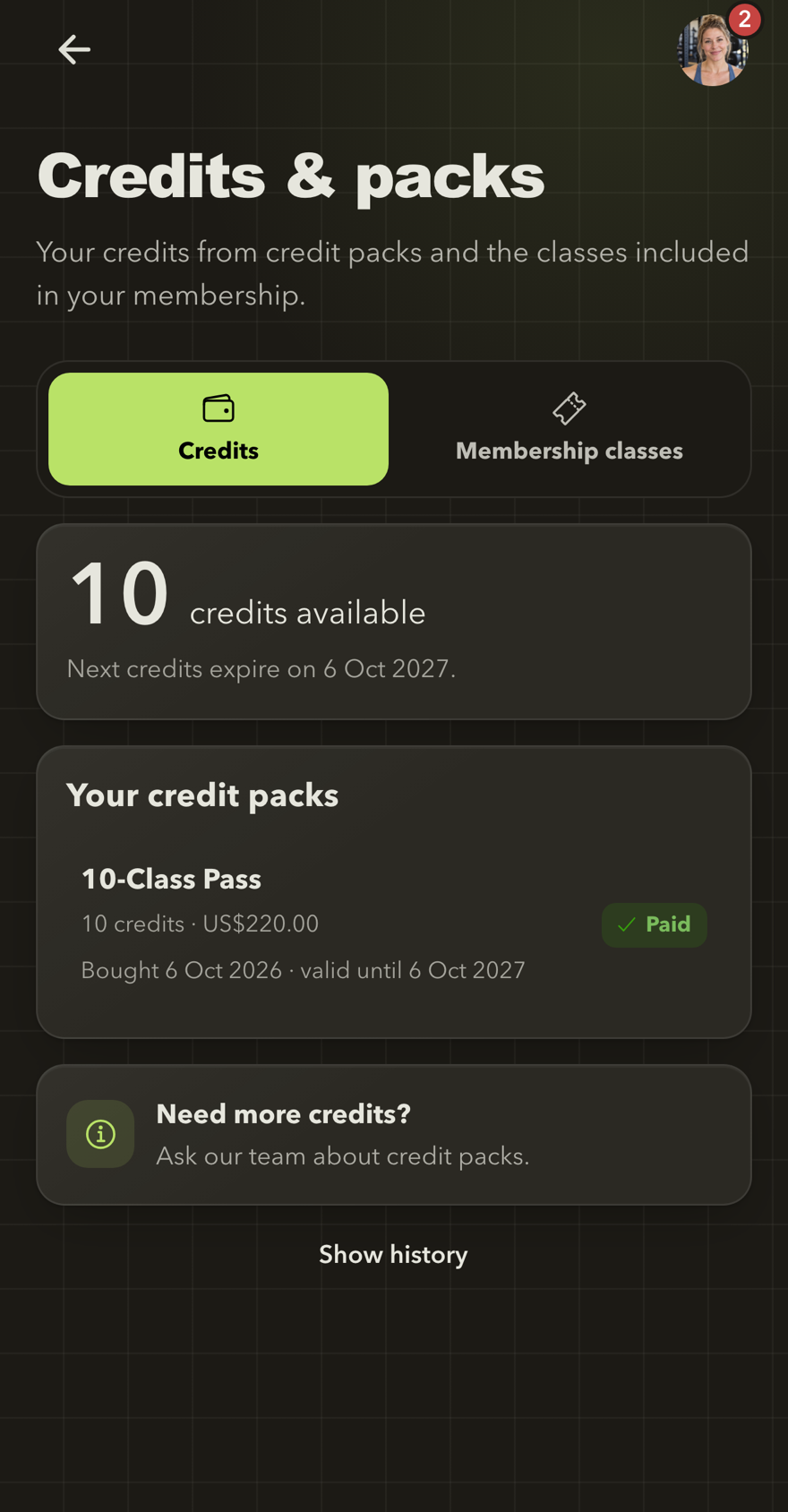
Your credits at a glance
See how many credits you have, when they expire and the packs they came from. Membership classes has its own tab.
- Credits shows how many credits are available, when the next credits expire and Your credit packs.
- The membership tab, for example Membership classes, shows how many events your membership includes in the current week or month, and how coming weeks are already used.
Select Show history to see credits added, used and returned.
Get more credits
Ask your gym's team. They add the pack to your profile; your credits are ready once the payment is recorded.
Where your gym takes payments online, Buy a credit pack lists packs you can pay for by card. Your credits are ready as soon as the payment is confirmed. Packs bought online cannot be refunded in the app.
How credits are used
- Booking an event uses the credits shown on the booking button.
- Credits that expire soonest are used first.
- Credits must still be valid on the event date.
- Cancelling in time returns your credits with their original expiry. Expired credits cannot be used.
Next: Book an event.