

Release Notes
v6.3.3 Web
A more visual gym website and a calendar shortcut for members. The iOS and Android apps receive them with their next update.
- New website order: your website now shows your hero video, About, The Studio, memberships and class passes, the calendar, Our team, opening hours and contact, in that order, and the menu follows it. Your website
- About on a photo: your story sits on a darkened photo of your studio, taken from your room photos.
- Room galleries: each room can have up to five photos (the first is the cover). On your website, a room with several photos opens a full-screen gallery with arrows on desktop and swipe on phones. Rooms
- A colourful calendar: classes and events show the colour of their event type, with a small legend above the calendar, and event types have a new Charcoal colour. Events and classes
- Add to calendar: after booking, members add the class or event to their own calendar, with the place and a reminder one hour before.
- Clearer class view: classes without a picture no longer show a placeholder, and booked classes show a "Booked" label with a checkmark.
v6.3.2 Web
Website improvements and a progress chart for lifts. The iOS and Android apps receive them with their next update.
- Contact phone on your website: staff change it under App Settings → General (Contact phone); an empty value hides it. The address in the footer opens Google Maps. Your website
- Class passes next to memberships: a "Prefer to drop in?" strip shows up to three class passes above the membership cards, and the menu has a Class passes entry.
- Your own domain opens instantly: gyms with their own branded domain show the website right away instead of the app's loading screen.
- Lift progress: the exercise screen has a Progress tab with the best set over time.
- Access card: a friendlier "Access needed" card replaces "off limits".
v6.3.0 Web
Your gym website becomes your members' home on the web, and adding members gets easier. The iOS and Android apps keep working as before and receive the improvements with their next update.
- Your website is the member area: when your website is published as your main page, signed-in members stay on it in the browser. Their profile picture replaces Member area and opens the familiar account menu (inbox, membership, credits, bookings, profile). They book classes right in the website's calendar, see their booked classes marked, and open their membership, credits and inbox inside your website. Your team still lands in the Admin Panel, with To website to switch over. Your website
- Invitations instead of short-lived password links: when you create a login for a member, they receive an invitation in your gym's design. The link works for 7 days, lets them choose a password and signs them in. If it expires, they can ask for a new one, and you can Resend invitation from their login details. Password reset and email confirmation links now also open a page in your gym's design.
- Let new members join directly: under App Settings → Member details → Joining, choose Join directly so people who sign up in your own app or on your own web address become members right away, without waiting for your approval. Join your gym
- Website polish: a cleaner calendar that follows your booking window, rooms, memberships and coaches that use the full width, an About section with a clear title, and on phones a menu button and side-by-side buttons. Members who have or had a membership no longer see the trial offer.
v6.2.2 Web
Improvements for gym teams in the web app. The iOS and Android apps receive them with their next update.
- Book members into events: staff add a member to an upcoming event from its attendee list, including members you added by hand, and choose how it is paid: their membership, their credits, pay at the gym (already paid or open) or free. The same capacity and booking rules apply as when members book themselves, only the booking window is skipped, and the attendee list shows who was booked by staff. Manage attendees
- A class calendar on your website: your gym website shows this week's and next week's classes in a calendar right after the header. Each class opens a card with its photo, coach, room and price and a button to book it in the app; phones see a list per day. Your website
- A fresh website design: rooms and coaches as carousels with uncropped coach portraits, a placeholder for coaches without a photo, alternating section backgrounds, a bigger logo, clear button labels such as Book a class and Member area, and icons for your contact details.
- Online payments: the payment pages show Stripe's logo and a clear heading. Online payments
- Notes: info notes in the Admin Panel look like notes instead of cards.
v6.2.1 Web
Improvements and fixes for gym teams and members in the web app. The iOS and Android apps receive them with their next update.
- Connect Stripe from your own web address: connecting Stripe and paying online now also work in gyms' own branded web apps, and connecting no longer fails for team members whose sign-in was renewed. Connect Stripe
- Online payments redesigned: an overview with the connection status, the available payment provider and your payment rules; Stripe has its own page to connect or create your account, follow the set-up steps, open your Stripe dashboard or disconnect. Online payments
- Membership types in your order: drag membership types into the order you want. Members see that order in the app's membership offers and on your website. Manage memberships
- Calendar: the member start page's schedule button is called Calendar, and the Calendar and event details load noticeably faster. Booking guide
v6.2.0 Web
New membership and event options for gym teams in the web app. The iOS and Android apps receive them with their next update.
- Event types: group classes, workshops and other types, each with its own colour, default price and member price. Choose per membership type which event types are included and how many visits are allowed. Events and classes
- Membership benefits: up to 20 benefits per membership type. Benefits can have an effect, such as a badge at check-in, perks that staff mark as used, or the member price for events. Each membership type can also set its own cancellation notice. Manage memberships
- Membership badge at check-in: the check-in screen shows the member's membership as a badge.
- Emails in your design: the emails Gymplify sends to your members use your app's colours, fonts and logo. Under App → Emails, Moderators and above see which emails members receive, when, and how they look.
- Admin calendar: every event opens a preview with its photo, description and details first; events at the same time share one card, and cancelled events are hidden by default and shown on gray cards when you include them. Edit or cancel an event
- Photos: places without a photo keep their size and show a placeholder, also on your website, so pages no longer jump while images load.
- Clearer messages: when a member or account cannot be deleted, the dialog says why, and notifications have a new look.
v6.1.1 Web
Fixes and improvements for gym teams in the web app. The iOS and Android apps receive them with their next update.
- Admin Panel for every team member: Admins and Moderators of gyms that set staff access per person open the Admin Panel again, and the sidebar shows the gym's plan. Staff access
- Checked in now: the dashboard shows how many members are checked in, a green dot marks members who are online in the app, and a long list clearly shows that it scrolls. Check in members
- Guides: new sections on your website's header video and on using your own fonts. Your website · Configure your app
v6.1.0 Web
Improvements for gym teams in the web app. The iOS and Android apps receive them with their next update.
- Check-ins at the front desk: the dashboard's Checked in now list updates live and shows everyone checked in, newest first. Staff check a member in with one tap from their profile, and a front-desk scanner keeps working after you return to the dashboard. Check in members
- Room capacity is a guide: an event may offer more places than its room's capacity, for example when people stand rather than train; the event editor shows a warning. You can change a room's capacity at any time, even when events are already scheduled in it. Rooms
- Website video: your website's header can play a short background video behind the headline. Your website
- Fonts: new gyms start with clear, neutral fonts, and gyms on a paid plan can upload their own brand fonts for the app and website.
- Fixes: the Add event form keeps your entries while you fill it in, and logo uploads during gym creation work reliably.
v6.0.0 Web, iOS & Android
Gymplify 6 brings class and event booking, coaches, rooms and push notifications to your gym's app. New modules are available on every plan; each one is off until the gym turns it on.
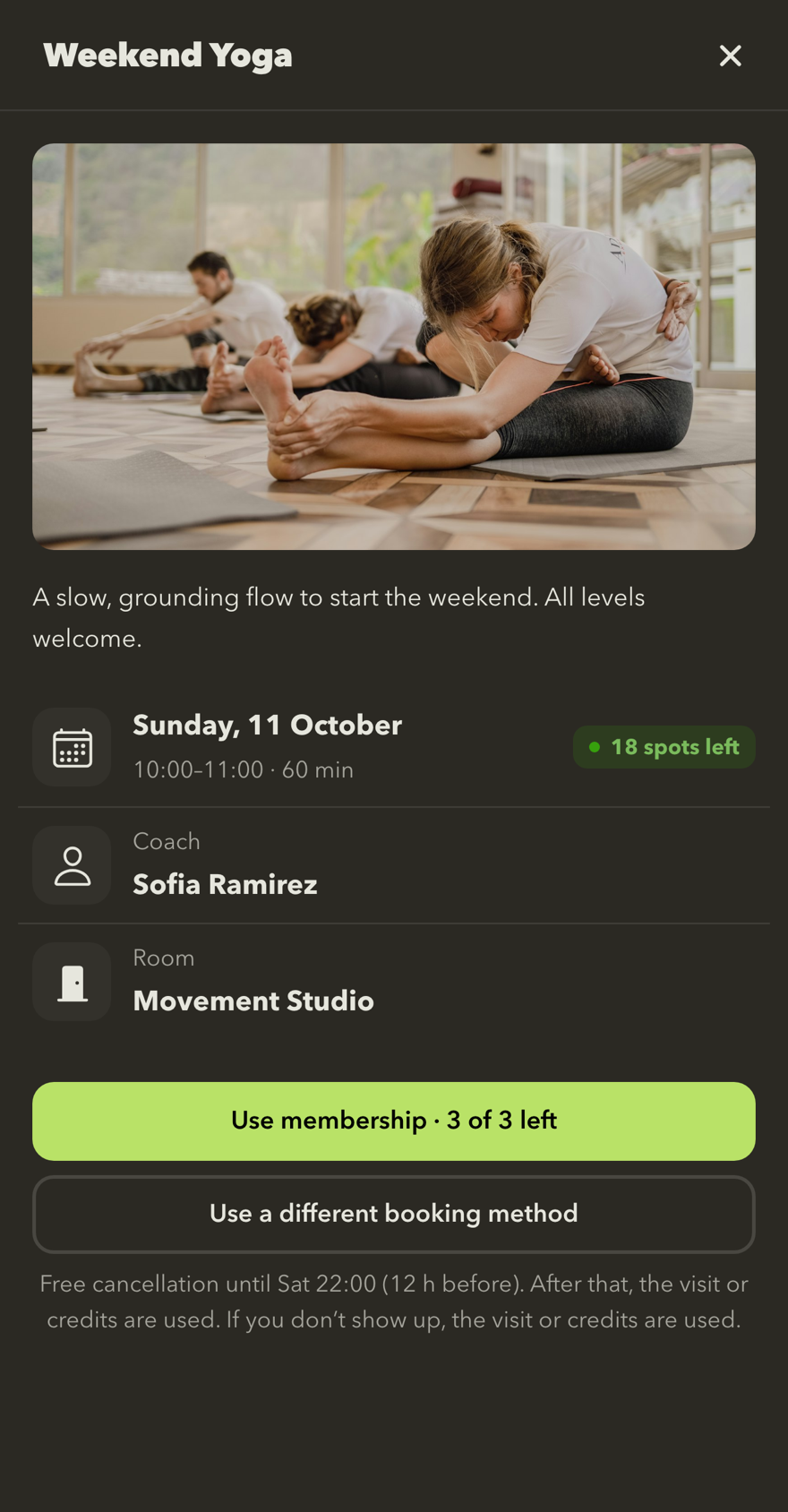
Book a class
Members see the coach, room and free spots, and book with their membership, credits or by paying at the gym.
- Book classes and events: pick a day, see the coach and room, and save your spot with your membership, credits or by paying at the gym. Booking guide
- Your bookings: your next bookings at a glance, with clear cancellation rules before you cancel.
- Coaches, rooms and shop: meet the coaches, explore the rooms, and see the gym's products and gift cards. Learn more
- Credits: credit packs, with your balance and history in one place. Credits guide
- Push notifications: for gym messages and booking changes, with settings to choose what you receive. Notification settings
- Memberships: your membership periods at a glance, including upcoming periods and your visit history.
- Your gyms: a new account home with all your gyms. Join a gym with your QR code or join code. Join your gym
- Wi-Fi: join your gym's Wi-Fi from the app, where your gym offers it.
- Everyday use: clearer settings, with values shown at a glance and edited in dialogs, plus smoother loading, clearer messages and many design and accessibility improvements.
For gym teams
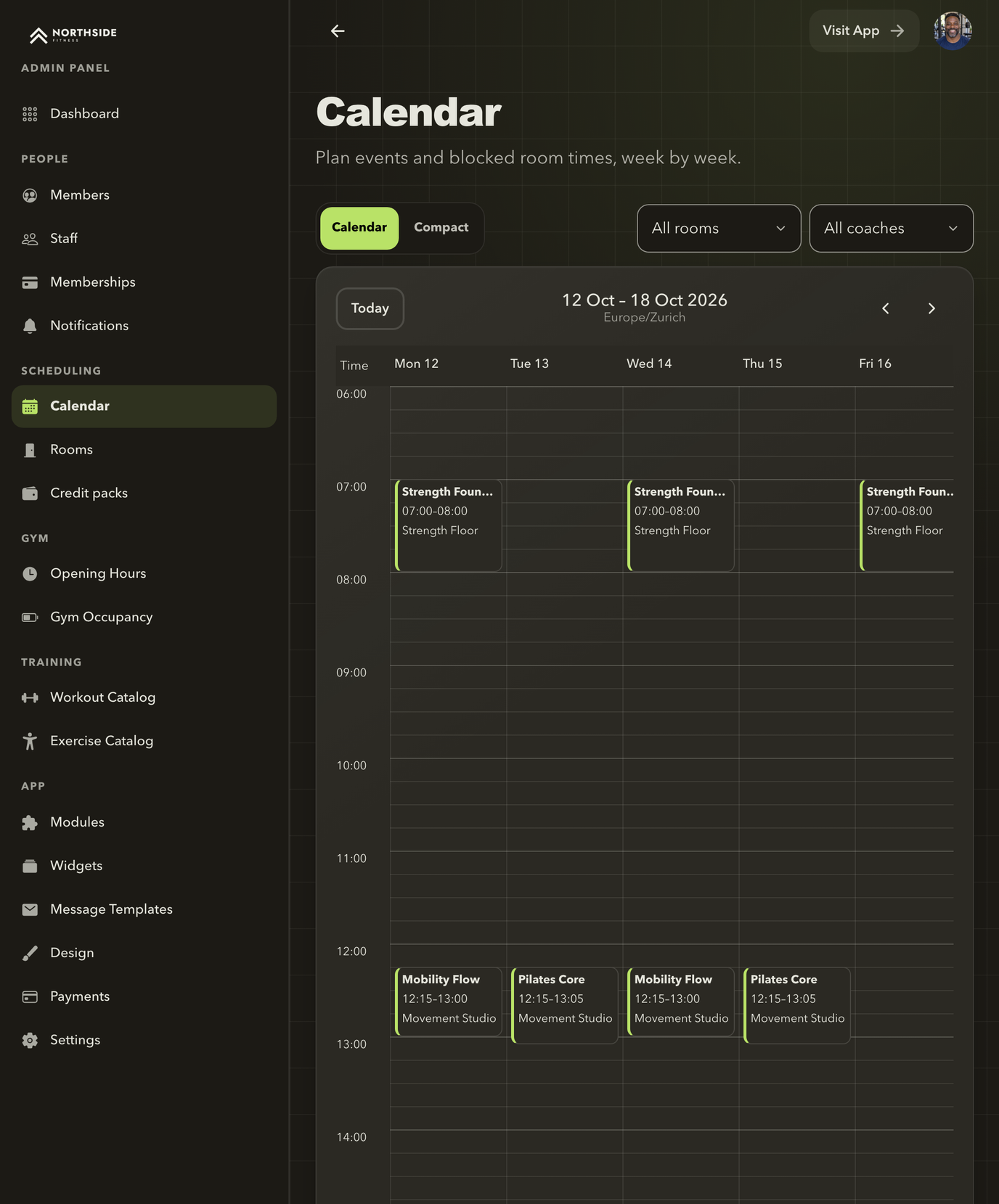
Plan your week
Single events, recurring schedules and blocked room times in one calendar.
- Events: single events and recurring schedules, blocked room times, coach requests, attendees, and payment options per event: membership, credit packs, pay at the gym, or free for everyone.
- Rooms with opening hours and blocked times, and coach profiles with photos.
- Credit packs to sell or gift, and a Shop that shows your gift cards.
- Your website, built from your app with your events, memberships, coaches and design. Publishing and web addresses depend on your plan.
- Team roles and permissions that you can adjust per person. Staff access
- A guided set-up for new gyms, a getting-started checklist and a Modules page to switch features on.
- A design library, membership types on their own pages, trial memberships, Wi-Fi and notification settings.
Available features depend on your gym's enabled modules, its plan and your role.
Earlier releases: Version 5.