

Create your gym's app
For the person who will own the gym's app. If you are joining an existing gym as staff or a member, connect to that gym instead.
Before you start
Have your business name and address, your contact details, and an app name ready. Sign up or sign in at app.gymplify.com and verify your email if prompted. Want to look around first? Try the demo on the welcome page shows how your app could look, without an account.
From app selection, choose Create an app. The Free plan includes one app; if you already own one, app selection says so before you start.
Complete the setup
The creation flow has seven steps. Required fields are marked (required) and must be complete before you can continue; optional fields are marked with *.
| Step | What to do |
|---|---|
| Business details | Choose your business type and enter its name. Your website is optional. Search for your address and select the matching suggestion, or choose Enter the address manually. Check the currency and time zone that the address preselects; you can change both here. |
| What you offer | Choose the modules your members can use from the start. Training, Check-In and Messaging are preselected. Choosing Events also turns on Rooms and Coaches and asks who can book your events. |
| App details | Give the app the name your members should recognize. |
| Your details | Enter your details as the person who will own the app. |
| Design | Choose the app's appearance and review the preview. |
| Terms | Read and accept the terms for operating the app. |
| Review | Check your entries, return to earlier steps if needed, then confirm creation. |
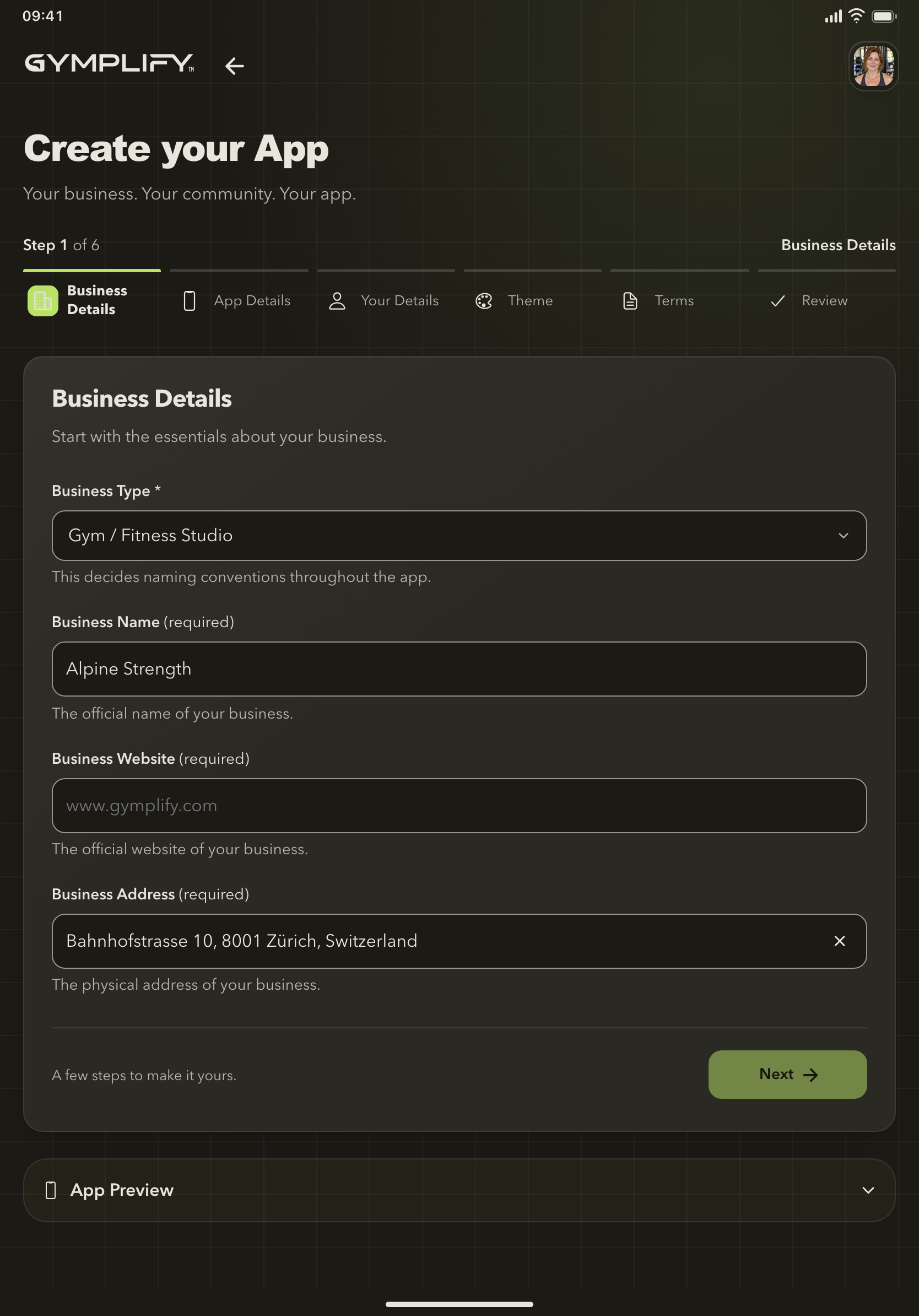
Create your gym's app
The setup flow guides you through business details, the modules you offer, the app identity, contact details, design, terms, and a final review.
Use Back to revisit a step. If Next is unavailable, check the required fields on the current step. For an address search, typing search text alone is not a completed selection.
If creating the app is interrupted, for example by a lost connection or a page reload, open creation again and confirm the review. Gymplify opens the app that was already created instead of creating a second one.
After creation succeeds, the new app opens on its dashboard. You also receive a welcome email.
Prepare the app for your gym
The dashboard's Get your gym ready card lists what is still open and links to each step. It updates as you complete them, and you can hide it at any time:
- Review your modules, settings, and home-screen widgets.
- Set opening hours, including any special dates, if you use them.
- Set your membership prices. The Standard membership starts at 0.
- Set up your events, if you offer classes or other events.
- Connect staff accounts and set up access.
- Add your first member.
- Add your logo and colors, then check the member view.
Review the Free plan and paid options as your gym grows.
Want an app published under your gym's name?
Creating a gym app gives you a space within Gymplify. A separate App Store or Google Play listing is the Dedicated App.